

New Order Process Launches
New Order Form for All Markets
We are releasing our new order process for all markets in June. The new order form has been operational in certain markets for some time and has processed over 25,000 orders, so it works well. It is now available everywhere. The benefits include:
- Showcase the selection of premium photography (which may be the only option in some markets). See samples of tours from around the country that showcases premium photos.
- Adjust the price for smaller properties, but allow for additional photos to be ordered for larger ones
- Lower price on self service options
- Choose from various floor plan and 3D tour services
- Order additional services, such as a custom slideshow video to additional service provider options, like aerial photos & videos, twilight photography and more.
- Add preferred (but not guaranteed) appointment times and other details.
This new process is part of our shift to provide the high quality content for a reasonable price. We understand we are not the cheapest, but we are also not the most expensive, and NO ONE else has all the tools and functionality we do, including our 2D/3D floor plan tools, automatic tour branding on select websites, free slideshow video and our exclusive Claim Home to HomeDiary feature for the buyer, and the seller (as a keepsake).
All of this content can get you more listings and help you sell them faster and for more money. See the research results from Zillow and NAR that found buyers highly value floor plans in our Power of Plans analysis.
View the Video to see a short overview of how it works
Now that we have an easier process for people to order, if you need a service that we are not providing, please talk to your local service provider, or shoot us an email or give us a call, as we would love to help you out!
Don't forget! We have several tour and theme options now. We highly recommend the Story format with the Cottage theme that provides a single property website layout with big content. You can also select the new Tour format to have a modern, responsive layout that is in the classic "fixed" tour (no scrolling) layout. This is great for embedding on a blog post for example. You can also use both at the same time. Just select your preferred default (such as the Story, which you can do in your profile or on Edit Details page), and then use the below tour URLs for each specific format you want to use in a specific situation (change the xxxxxx to your specific tour ID, which you can find in the email we send or on Manage Tours).
- Story Format - https://www.floorplanonline.com/story/xxxxxx
- Tour Format - https://www.floorplanonline.com/tour/xxxxxx

Just remember to use the https at the beginning so when you embed it, you will not get security errors AND this is what enables Brandkeepr on various websites. The tour link we email you when your tour gets published is what you should put into the MLS, but you can use the other link for any other purpose (such as a blog post, social media campaign or email blast).
If you would like to embed the whole tour on your website, all you need to do is copy and paste the sample embed code below into a blog post and change the XXXXXX to your specific tour ID. The whole tour should then work on your site. Note, we recommend using the TOUR format for this purpose, as reflected in the URL (includes "tour" in the url) within this embed code below. If you would like to start the view with specific content, just go to the tour version, click on the content you want to show when it loads, and then copy and paste the URL part in the exact yellow highlighted part below. An example link that starts with the floor plan view is https://www.floorplanonline.com/tour/62568/b/floorplan and it looks like this screen shot.

Sample Embed Code
<iframe name="tour" src="https://www.floorplanonline.com/tour/xxxxxx" frameborder="1" width="100% height="700"></iframe>
Read more about embedding the tour and how to customize it here


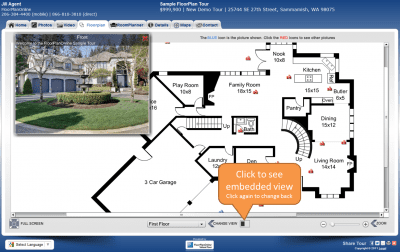 Embedded and Side by Side FloorPlan Views for Interactive Floor Plan Tours
You must be logged in to post a comment.