
by Christine Cox | Aug 9, 2018 | Spotlight Tours, TX
Prime Location Townhome
See The Story of This Home
Austin, Texas
Meticulously updated 2-story condo in prime downtown location! Premier touches dot this modern charmer from walk-up. The custom bookshelves, pine floors, hand-painted tile work, and dream kitchen, complete with ALNO cabinetry, make this a must see.
The open design and thoughtfully curated nooks create a light and spacious feel with no wasted space. Ample outdoor courtyards, highlighted by custom porch coverings. With a touch of luxury and a premier location, this intricately designed condo has it all!
Professional photography, Matterport and custom video provided by Travis Baker from TWIST TOURS.
If you are interested in listing your home or have questions, please contact:

by Christine Cox | Jul 31, 2018 | CT, Spotlight Tours
"The Sanctuary"
Stamford, CT
See The Story of This Home
Welcome to ''The Sanctuary'' an amazing home blending vintage architectural character & quality with modern living & beautiful property offering a serene, peaceful & private estate setting, yet convenient to Greenwich, minutes from downtown Stamford and the train to New York City. The foyer leads to the spectacular sun filled great room with 18 foot coffered ceiling, fireplace & terrace which overlooks the rolling lawn & stocked lake. The formal dining room can accommodate 12 for dinner or enjoy the bright sun room for dining as well. This home has terrific flow for entertaining! A nicely sized & updated kitchen offers granite counters, dining area & leads to the beautiful birch paneled family room with built-ins & cozy fireplace. A sizable study with fireplace accesses the terrace.
Aerial and Property photography provided by FloorPlanOnline Photographer, Larry Merz.
If you are interested in listing your home or have questions, please contact:
by Kris Cone | Apr 22, 2014 | Listing Tools, Technology
We recently launched a new 2 page flyer template that has one large photo on the front and then the floorplans and more photos and text on the back (or if it is a photo tour it had more photos on the left hand side). Just select the template when you go to Edit Flyer, as shown below. Mouse over the color area and click to open the color palette that allows you to pick a color…or even enter a custom color code, so you can match it exactly to your branding.
You can show or hide various things like Price, the QR code or even the tour link. The flyer can also be uploaded or imported into xpressdocs right from your account, or you should be able to upload it to any other printing company to get professionally printed flyers.
To get started just login to your account and go to Manage Tours, then Edit Tour/Edit Flyer. Download a Sample Flyer

by Kris Cone | Jul 20, 2013 | Listing Tools, Tour Updates
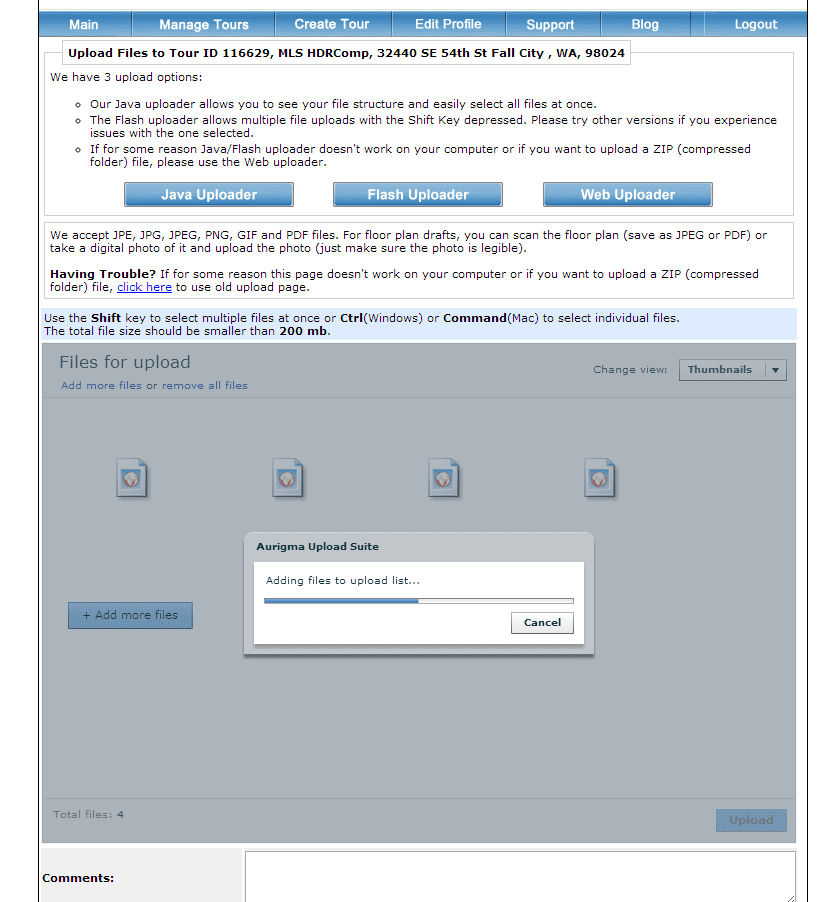
We recently made an update to our photo uploader tool to add a new Flash upload option. The default uploader is a Java-based program that requires Java to run and work on your computer. While 98% of computers have Java installed, there are some recent issues due to security concerns, and users of Apple computers are periodically experiencing issues where they can’t upload with this version, because Apple blocks Java from running on the Mac, at times. In addition if you are a Mac user and use Chrome as your browser of choice, the Java based uploader does not work because Chrome is a 32 bit application, and Java is a 64 bit application for the Mac.
So…we added a new Flash uploader that uses Adobe’s Flash tools to upload photos. It works pretty good, you just do not see your file structure initially. You need to click the button to +Add More Files, navigate to where you have the photos stored on your computer, and then you can use the SHIFT key (start at the first photo and then hold the key down, and click on the last photo to select all photos in that folder) or the CTRL key (hold the CTRL key and then just click photos you want to upload to highlight them) to select various photos. You will then see them added into the upload window. Then just upload.
You can also use the Web Uploader where you select one photo at a time, if all else fails. This option does support the uploading of zip files too, so you can compress your images and upload.

by Kris Cone | Mar 6, 2013 | Listing Tools, Tour Updates
I am really excited to announce some cool updates to the Single Property Website Tour. Click here to see a sample tour.
Updates include:
- Centering of the tour on any web page (it used to be left justified)
- Better fitting of the content to eliminate scrolling of the main content area
- Cool wrap around styling of the content section headers
- Ability to change the overall background color…so now you have two colors to showcase your brand and enhance the look of the tour. It makes the content really pop!
- Ability to upload a background image – this could be the image of the property, a view of the area, or a custom branding image featuring your logo. For now, the custom background image only shows on the branded tour.
You can make these changes on a tour by tour basis, or in your profile to have them apply to all future tours.
A little tip. If you use Google’s Chrome browser, you can install a free “color picker” tool that allows you to get the color code for any color on any web page. Click here for a list of programs you can install for free to get the color code. Once you have the code, go to Edit Details on the Manage Tours page for a tour, or Edit Profile, and put the color either in the background 1 or background 2 spot. You can also do this for text. For example, this green is the color code #878f55
It is really simple to do and is another way you can really showcase your brand. The next training session will go over some advanced tour customization tricks. Click here to register…it is FREE!
 We would love to hear feedback….please comment or post something in our support forum.
by Kris Cone | Oct 18, 2012 | Listing Tools, Technology
We have some exciting news to share…the ability to add video clips in your Virtual WalkThru Video! But there is more…not only can you upload a clip of a fountain, a boat skimming across the water, or whatever you want to showcase on an individual tour, we also added the ability to upload Agent Bookend Videos to your profile, and then add these videos to every WalkThru Video, just by checking the box! Posting to the MLS? Don’t worry, you can just have your bookend videos show on the branded tour, or if you make the bookend video generic (without any of your contact info, name, etc…), you can include the bookends in both the branded and unbranded videos.
See our How To Video to learn more on how you can create a really custom video for your tours[pb_videoshowcase group=”8″]
See an excellent example of the power of this feature by clicking the Video tab below or see http://www.seetheproperty.com/102379, provided courtesy of Best View Photography. http://www.bestviewphotography.com
[fpotour emt=”embeded” bgc=”ffffff” ftc=”ffffff” bnm=”1″ tbs=”01111111″ swi=”3″ oid=”102379″ mtp=”0.80″ uid=”5J5R307R” wid=”960″ hid=”700″]
This is also an example of how you can embed the whole virtual tour into your website!
While we believe a great photo with animation to simulate movement is a powerful tool, a video clip can evoke emotion up and above what a photo might provide. So give it a try. It’s FREE!
As always, you can view all of our help videos here.



You must be logged in to post a comment.