3D FloorPlans & Model
July 16, 2010
Check out this cool online 3D floor plan which can be printed to a real, physical 3D model. I can also include any furniture or other details you drag and drop onto the floor plan. It is still in development, but we hope to launch this in 2010.
Embed Your Own Custom Video & More
July 7, 2010
I hope you all had a happy and safe 4th of July!
We wanted to let you know we just launched a few new enhancements/tour features you might like:
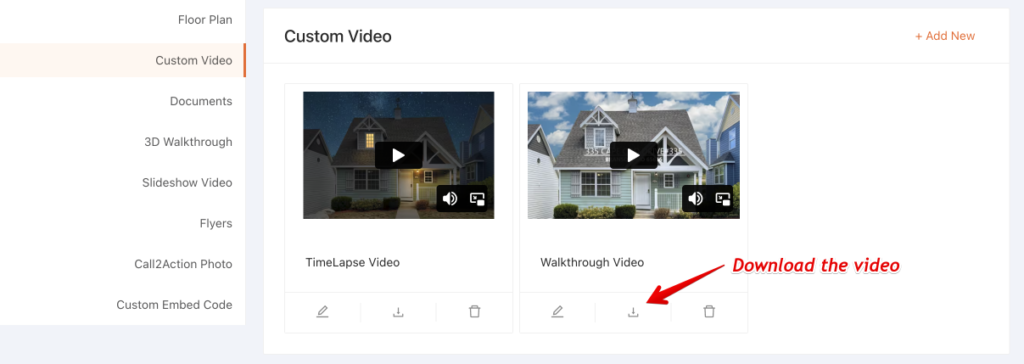
1. Custom Video. You can now embed your own custom video into the FloorPlanOnline virtual tour. You can even turn off our Virtual WalkThruTM Video and just display the video button for your embedded video! This is great for listings that have a custom produced video and you want to prominently display it under the Media section on the new FPO 2.0 tours. In order to use this, you will need the embed code provided by the company that created your custom video, or you can upload a video to YouTube and use the embed code YouTube provides. Select the largest size possible (like 960×745 pixels) so it fills the content area. Note: this feature is not available for the original FPO 1.0 tour format.
2. Property Documents. With the launch of the FPO 2.0 tour in May, we added the ability to upload property documents, such as disclosures or other reports, to your tours for display under More Info. There is now a way to delete a previously uploaded document. To upload a document, just select the button to upload the document (PDF or Word file) when you create the tour, or go to Manage Orders, then click on “edit” under Order Form and then scroll down to the property documents section. To delete a document, just select the “delete” link.
3. Tour Formats. We are working to add a new “Classic Virtual Tour” template that is more landscape oriented with the media buttons on the bottom….so it will be a little more like the original tour format but with larger content areas and more customizable (colors, features, additional resources), like the web page version of the FPO 2.0 tour. Look for this in the coming weeks. We have also heard from some of you that you would like to keep the original FPO 1.0 format for your tours. We can certainly accommodate this request. Right now, there is no way for you to select this option when you create a tour (but it will be there in the future). For now, you can email us or call us and we can add a note to your account to have your tours produced in the original format. Note: some items, such as the Feature list, additional resources, and property documents are not available on the original tour format.
4. Video File/YouTube. Many of you have expressed the desire to have the WalkThruTM Video uploaded to YouTube, as well as additional tour distribution options. These things ranked high on the recent survey as well. I am pleased to announce we are actively working the conversion of the video to a format that is acceptable for upload to YouTube, so this should be ready within 1 to 2 months after some testing and purchase of additional software. It will include the ability to download the video file under Marketing Materials for your use as well. Once this is completed we will work to add more tour distribution options, such as Zillow, Trulia, etc.
We have a long list of other enhancements coming in the next 6 months. Once some of these projects get closer I will provide a more detailed update. We really value your business and your feedback to help FloorPlanOnline be the best property tour out there. Please feel free to email me directly with any comments, questions, testimonies or concerns.
Best Regards,
Kris Cone
email: kris@floorplanonline.com kris@floorplanonline.com
FloorPlanOnline Around the Nation
June 7, 2010
The New FloorPlanOnline FPO 2.0 Product launch has generated interest from Jacksonville to Chicago, From Tech Forums to Green Living Groups! Here are some of the most recent News Articles and blogs that talk about FloorPlanOnline Real Estate Marketing.
Thanks to these respected publications for helping share the FloorPlan Online growth and development story.
http://atlanta.daybooknetwork.com/story/2010/05/26/32181fpo.shtml
http://www.greenbuiltblog.com/floorplanonline-offers-unique-virtual-tour-tools-507/
http://www.atlantarealestateforum.com/floorplanonline-launches-version-2-25731/
http://www.carolinarealestateforum.com/agents-need-floorplans-323/
Help Soldiers Coming Home
May 25, 2010
Joint Base Lewis-McChord, the third largest base in the United States welcomes home this summer 18,000 troops at roughly the same time from Iraq and Afghanistan.
Homecomings are special, especially for the moms and dads walking into the arms of their families. But for 7,500+ single soldiers, often their first night home is inside a bare, bleak barracks room. With combat stress and other mental pressures, sometimes this is a recipe for disaster.
The Fort Lewis Chapter of the Association of the United States Army plans to change that by raising enough money and supplies to give each returning single soldier a welcome home basket in their rooms. We want to make up their beds, give them snacks and water, stock their bathrooms and provide as homey a homecoming as we can. These are mostly teenagers and early 20-somethings with big appetites arriving home late at night when the chow halls are closed. We need snack and microwavable products, non-perishable with expiration’s good through August, 2010.
Any cash donation or product donation goes a long way. You can imagine the support we need to fill 7,500 barracks rooms with the love our returning heroes deserve. Please give generously. You will be recognized for your contribution in a special edition of the Ranger and Airlifter newspapers publishing June 3, 2010, AND in an insert going inside each barrack’s basket.
The Association of the United States Army – Fort Lewis Chapter is a 501(c)3 so the donation is tax deductible. You can send the money to AUSA Fort Lewis, c/o The Ranger newspaper, P.O. Box 98801, Lakewood, WA 98496. Any questions, and to coordinate delivery of items, please contact Denise Dhane at (253) 686-1505 or denisedhane@yahoo.com, Carlene Joseph at Carlene.Joseph@Harborstone.com, or (253) 312-9279, or Ken Swarner at (253) 584-1212 or publisher@ftlewisranger.com. We hope to hear from you soon. Our soldiers start returning home at the beginning of June.
Sincerely yours,
Ken Swarner Publisher The Fort Lewis Ranger/NW Airlifter/Weekly Volcano/NW Veteran/Swarner PR 253.584.1212 northwestmilitary.com weeklyvolcano.comInternet Explorer 6.0 Fix Live!
May 15, 2010
We have made a development fix for the new tour and its support for Internet Explorer 6. There was an issue with the new tour layout and users who have Internet Explorer 6 (IE 6) installed as their web browser – these users could not see some of the content and formatting. IE 6 is an old, outdated version that does not support some of the functionality and features on the new tour format.
With the fix, we now detect the browser of the user, and if they have IE 6 on their computer, we will show the old tour format to that user vs the new tour format. This will ensure the user sees the content of the tour…it will just be in a different format. As long as you created the tour in the new format, this browser detection is automatically supported – you do not need to do anything.
If you are using IE 6, we strongly recommend you upgrade to the latest version of Internet Explorer – version 8 and also upgrade your flash player, or download Firefox. Firefox is a great alternative to IE. It is generally faster as well and has some customization capabilities. You can download Firefox at www.firefox.com. Please also install the Adobe Flash (to see the tour content) and Adobe Reader (to view PDF files) plugins. Please note Microsoft is ending its support for IE 6 completely in July…so if you have it, your computer is going to have a very high security risk for getting viruses, malware and spyware. We STRONGLY recommend you upgrade.
We are also working on some fixes to the content area that we hope to have live next week, that include automatically adjusting the content area for the screen size so the content area is always visible on the screen and we show the photos side by side with the floorplan. Currently, if you have a narrower screen size (for example 1024×768) we show the embedded floorplan view which has photos popping on top of the floorplan.
Thanks for the feedback and as always, your business!
-Kris Cone
New Tour Feedback
May 6, 2010
I wanted to thank everyone for the positive and negative feedback on the new tour layout. Some people love it…some people do not. Let me address some issues, and resolution to the issues.
1. Floor plan view – first…some people are not seeing the floorplan side-by-side with photos (similar to the old tour view). The reason is we have a screen resolution detection feature to show a different view to some users based on their computer screen, and right now, it is set to not show the right tour for some users. We are changing this by the end of this week, so i
f your screen is 1000 pixels or wider, you will see the floor plan side-by-side with photos. If your screen is less than 1200 pixels (which is less than 2% of users, per our statistics), then you will see an embedded floor plan view where the photos show on top of the floor plan. To see your screen resolution on a Windows computer, just right click your mouse on your desktop and then either select Screen Resolution (Windows 7) or Properties, then Settings (Windows XP).
The floor plan side-by-side photos view should look like this screen shot….photo on the left, floor plan on the right. The floor plan can also be zoomed in.
2. Content window and scrolling. We understand some people may need to scroll to see all the content window. We are working on making an adjustment to the content window to make it a little smaller if your screen height is 900 pixels or less, which should reduce the need for scrolling. If you have many toolbars on your browser, you may still have to scroll….but you can disable the toolbar by removing them under VIEW, Toolbars and un-check those you do not need.
FPO 2.0 New Tour Issues
May 3, 2010
Hi FloorPlanOnline Customers!
Well, the dust has settled from our weekend release of the new tour. The release went surprisingly well….probably one of the best releases we have ever done in terms of few issues and the issues getting fixed quickly. I did want to point out a few things that have come up today regarding the new tour and tour conversion.
1. Portrait vs Wide-screen View. Depending on your screen resolution, you may see a little different content view for photos, video and the floor plan. If you have a screen resolution of 1024 pixels wide or less, you should see the “Portrait” version of the tour, which has photos in a 4:3 aspect ratio (similar to the old TV size before we had wide-screen TVs) and the Floor Plan View is the embedded floor plan vs the side by side floor plan view. We have set it up this way because the content would have to be very small or it will run off the page to the right. So to provide users with these screen resolutions the best view, we alter what they see to the Portrait view. Users with screen resolutions larger than 1024 will see the Wide-screen view which has photos in a 3:2 aspect ratio (what most digital SLRs shoot today) and 16:9 photos will be supported with an ability to mouse around the photo. In addition, the Floor Plan View will have the photos (here they are in a 4:3 aspect ratio) side by side with the floor plan, similar to the old tour view. You can always change a Portrait version to a wide-screen by adding &ws=1 to the end of the tour lnk, such as www.seetheproperty.com/presentation_v2/presentation.php?order_id=61383&mode=branded&ws=1 ….so if you do see the portrait version, you can see how the Wide-screen will look.
We have noticed that on some computers, the widescreen version is not showing up as the default view when it should be…the Portrait version is, so that is something we are working to fix.
2. FloorPlan/Photo Icon issue for tours created between April 15th and April 30th. For tours produced between April 15th and April 30th, we have done some work to ready the floor plan for the new tour by making a version of it in Flash, so it can be zoomed in if it is used in the new tour. Right now, if you convert a tour produced during this time frame to the new FPO 2.0 format, the floorplan on the tour is automatically changing to this flash version. This causes all of the photo icons on the floor plan to be mis-placed because it is a different size and file type. Therefore, be aware that if we convert the tour, the photos may need to be repositioned. You can do this for free or we can do this for the $20 conversion fee – if this issue was brought up to you before the conversion. We are working on a fix here.
3. Content Area View-ability. On some computers you may not be able to see the complete content area without scrolling. We are aware of this issue and are working on a fix to adjust the size of the content window if your vertical screen resolution is 900 pixels or less. We will make the content area a little smaller so it fits on the screen without scrolling.
4. Some Internet Explorer Issues. On some computers, the Photos and Video may not load…you may get a blank area. It appears to be an issue with Adobe Flash. The simple fix is go to www.adobe.com and download the most recent version of Flash. Install the update, close out your browser window, and then open it up again and try the tour. This seems to fix the problem. We are investigating what changed, as it was fine last week….this could have been caused by a recent Windows Update. The tour works in Firefox, Chrome and Safari. Go figure…another issue with Microsoft software???
We have had some great comments so far. Please send us comments, testimonials, complaints and more!
Cheers
-Kris Cone
FPO on the Radio Today (listen here)
May 3, 2010
FloorPlanOnline Marketing Director Chris Drayer Spoke with Mike Muller about the new FPO 2.0 Live on the M Files Real Estate Technology Radio Show Today.
Learn More about Marketing Guru and Radio ShowHost Mike Muller on his blog http://areweconnected.com/
Quick Tip: Check out what Mike can do with your Facebook page!
Listen each week Monday at noon Pacific for Mikes Tech Tips Tricks and Tools For Real Estate Agents.
Heres the recording of the Show: http://areweconnected.com/the-m-files/
New Sign Rider Process
May 2, 2010
I am pleased to announce we have changed our sign rider process, for the better. In the past, we acted as a middleman to place orders with a sign vendor. Now, we are directing you to ABetterSign.com, a Georgia company that can ship signs anywhere in the United States. The benefits of this arrangement are many:
- Lower Price – signs are now $10.40, so with shipping, you can get a sign for around $20. We do not make any money on the sign….so you save at least $10 a sign. Plus, since we are no longer the “merchant” there is no sales tax.

- Higher Quality – we have narrowed the material choice to a new Duraplast material which is a solid plastic sign that is similar to wood. No more corrugated plastic! It is a very nice, solid material and will stand up to a lot of weather.
- More Customization – now, you can pick from different templates and customize the sign EXACTLY to how you want it. You can upload an image of the house, of you, or just have a direct link to the virtual tour. You can also pick different sign sizes and colors. How it looks is up to you and they have an easy to use online design tool. You can save your initial design and then reuse it for different tours in the future.
The new process might take a few more minutes, since you will need to enter your shipping and billing info with Abettersign. But you can save your information by creating an account. Overall, we think you will be much happier with the end product at a great price, and that is what matters most! If you want to save even more money, get a few signs with www.FloorPlanOnline.com/_____ and fill in the blanks with numbers that can be resued.
Why get a sign rider? According to the National Association of Realtors’ Profile of Home Buyers and Sellers 2009 report, 59% of respondents quoted the Yard Sign as an information source used frequently or occasionally. Of course, 90% said the Internet was used as a source! We provide a basic mobile tour for every listing….so let people see some basic info while they are driving by….which can lead them back to you! Plus, it can save on printing costs with flyers if they can get the basic stuff at the “point of browsing” without a piece of paper. And did I mention, it is greener too!
To place a sign order, just select Order Now once you confirm a new tour order, or go to Manage Orders, and click the “view” link under Tour Upgrades, then the Order Now button for Sign Riders. A new web page will open to ABetterSign.com and you can create your new sign!
FPO 2.0 is LIVE!!!
May 1, 2010
We are pleased to announce that the new, FPO 2.0 Virtual Tour format is live. The new tour format will apply to all tour orders placed on or after May 1, 2010.
See an overview video below or check out the FAQs to get answers to some common questions.
We need Help from Agents, Buyers and Sellers
April 30, 2010
FPO 2.0 is Brand New – So What do you think of it?
Since no one has used the new tour yet, there is no feedback to for us to discuss or use in our Marketing! What is your first impression? Do you think buyers will like the design and navigation? Will Sellers still want Agents to do more (sellers always want you to do more ….)
Its an all new tour and we need your feedback. Tell us your likes or dislikes! We also need testimonials for OUR marketing! You could be famous! (or at least get a good back link from us) So ….What do you think?
Here is the Demo tour link for you to check out and share – www.111AnyStreet.com
Please use the form below to send us comments or use the comment feature on this post to share with others. Be sure to include a link to your website if you would like to see it posted!
Thanks for your Feedback!
Inside the NEW FPO 2.0 Premium Virtual Tour
April 23, 2010
FloorPlanOnline Real Estate Marketing is proud to highlight more details of FPO 2.0.
Enhancements are Everywhere – but here is brief look at the Floor Plan View, Photo Viewer, WalkThru Video and the all new Room Planner.
FloorPlanOnline Customers will instantly feel at home with the updated FloorPlan View. FPO 2.0 has the same simple to use Click the kitchen & See the kitchen system. The Floor Plan View is larger and looks more crisp with higher resolution. The built in zoom feature allows detailed floorplan inspection. This is especially useful on a large property.
The best part of the FloorPlan view may be the new Full Screen option. Its a bit of a hidden gem - so look for the square screen icon with arrows pointing outward to view the floorplan virtual tour full sized.
The New photo viewer is easy to use and very stylish. Buyers may mouse down to scroll thru the property photographs in a crisp resolution wide ratio format. There are now two modes within the photo viewer – sideshow or photo gallery mode. Both now incorporate customizable text to any photo.
The Full screen option makes the high quality images pop off the buyers screen.
The All New Room Planner is incorporated directly into the tour. Room Planer allows buyers to drag and drop furniture on the floorplan in the Virtual Tour.
This tool causes interested buyers to get emotionally attached to the listing while decorating or updating the listing with furniture, rugs, appliances and landscaping.
Room Planner turns a listing into a home.
Video is a key component of the new FPO 2.0 Virtual Tour. The FPO system automatically creates the WalkThru video using the photos. You can always change the music, set different photo movement (“transitions”) and photo position, and even adjust the display timing for each photo (all under Edit Tour/Edit Video). The WalkThru will be featured in the Dashboard View and on the left media column of the tour. It includes high resolution wide style photos, your choice of 300 music pieces, complete edit-ability, customizable text and the loop feature.
You may also include your own video link (such as YouTube or Flip Video) on the tour as a link under Additional resources. Future enhancements will allow it to be directly embedded in the tour under the Media options.
FPO 2.0 will bring a high level of information to the home buyer about a listing. Our goal is to provide the most robust content platform for property online. We are taking great care to offer this premium service afford-ably and efficiently.
FPO 2.o by FloorPlanOnline Real Estate Marketing
Simple – We can Photograph, Measure and Produce
Effective – Buyers want to see Floor Plans with Photos
Affordable – Feature Rich without a Long Term Contract
Premium Virtual Tours for Top Agents
First Look at FPO 2.0 – The New Virtual Tour
April 22, 2010
Announcing The All New Premium Virtual Tour from FloorPlanOnline.
We call it FPO 2.0 – Home Buyers will call it Amazing. Enhancements are Everywhere.
This is the First Public Screen Shot of the all New Format. The FPO 2.0 Quad view Navigation (below) is all new. Virtual Tour title, background color and many other options are all customizable. The new Format is easy to use with new icons, contemporary look and built in SEO (Search Engine Optimization).
The New Format goes live May 1st 2010.
Classic Floor Plan Online Virtual Tours and New Orders placed today will be upgraded to the new format at no additional charge.
FloorPlanOnline Real Estate Marketing – Premium Virtual Tours for Top of the Line Real Estate Agents.
Simple, Effective and Affordable.
Invoices for Tax Time
April 7, 2010
It is that time of the year again when we dust off our expense receipts and try to collect things for our tax returns!
Regarding your FloorPlanOnline virtual tours, each tour has an invoice online that you can print as a receipt. Just login, go to Manage Orders, and then click the “view” link under Marketing Materials. The last button on the page is View Invoice. Click that and you can see the charges (there is a date stamp next to each charge) and print the invoice for your records (note a link to the invoice is also in the email we send you for reviewing the draft tour, as well as under Edit Order from the Manage Order page).
If you have an older tour, you can always see the invoice, even if the tour has been archived because it is older than 1 year. You can either go to one of your more recent tour invoices and replace the order_id= with the older ID for the older tour, or use this link and replace the order_id= and the member_id= with your information (where the red x’s are in the link below).
http://vifp.com/order_invoice.php?order_id=xxxxx&member_id=xxxxx
The invoice should then show on the web page. You can then print it for your records.
Hopefully this helps the pain of filing your taxes!
Room Planner Is Live!
March 15, 2010
FloorPlanOnline is excited to give you a glimpse at FPO 2.0 with a cool new floor plan tool – the Room Planner! The Room Planner allows buyers to move furniture and other items into your FloorPlanOnline Virtual Tour. And the best part – for the Spring Listing Season, Room Planner is FREE for any tour produced and approved on or after March 15, 2010. That is a $20 value provided at no additional cost! To learn more, watch the Room Planner Video below or click here to see a sample tour. Just click the icon in the floor plan area to open the Room Plan tool.
How to order. The Room Planner will automatically be added to all tours produced AND approved, on or after March 15, 2010. There is no need to do anything! You should expect to be Planning rooms on your tour within 1 business day after your tour approval.
If you would like the Room Planner added to an existing tour created before March 15th, call or email us and we can add it to your tour for only $10. (50% off the retail price!) Just call 866-810-3816 option 3 or use the form below and select the Room Planner option.
Floor Plan Online is proud to offer Premium Marketing tools for top of the line Real Estate Agents. Our Products are Simple to use, Effective with buyers and Affordable – feature rich with out a long term contract.
New to FloorPlanOnline & Want to Get Started? Click here to Register Fast and Free!
If you do not want this tool on a specific tour, its easy to remove. You can elect to not have it created for your tour as you place the order, under Tour Upgrades – see the Tour Upgrades box right after you confirm your tour to remove it from your order. Alternatively, the Room Planner can be removed if it has been added to your tour by going to Manage Orders>then Edit Tour>then Edit Photos on FloorPlan – just drag the RoomPlanner icon to the right under Pictures Library and save.
New Agent Testimonial
March 11, 2010
VERY Impressed with Service and Business Model.
I have to say I have just gone through my first listing in my Real Estate Career. In my prior career I worked for a large WW wellknown Vendor and I was a product manager for technology products. I am so impressed with the toolset, quality of service the product and processes deliver, and especially the customer service. This has been the best value and service I have leveraged in my Real Estate Career and I can not imagine not doing a listing without IT!! Your team is doing a GRAND job and I had fabulous responses from Tree and Elena on the questions I submitted with immediate response time. Thanks again. Tami
Tami Garneau, Fonville Moriseywww.fmrealty.com Tami’s Tour: www.floorplanonline.com/58233
Corporate & Sub Account Support
March 9, 2010
I have talked to a lot of customers recently about situations where they have multiple accounts and need access to those account. So I wanted to let you know we support what we call a Corporate/Sub Account structure. Normally, when you register with us, you create an individual account. However, you can create a corporate account, and then once you have a corporate account, you can create sub accounts (this is done in the corporate account under the Manage Sub Accounts on the right when you are logged in), or with the corporate account info, an agent can create a sub account underneath your corporate account. All they need is the Company customer ID and the company password. The option to register as a sub account is located on our registration page, or click here.
With the Corporate/Sub account structure, you can have one person manage the office tours, for example, but each agent can get access into their own account. The corporate account sees all tours for each sub account. You can also place tour orders out of the corporate account for any sub-account. Just select the drop-down on page 2 as you are placing an order. This account structure is quite handy for companies that do some of the work for agents.
We can also set things up so the corporate account pays for all sub account tours. Please call us at 866-810-3816, option 3 if you would like to set up a corporate/sub account structure or you can always send us an email. Just use the form below.
-Cheers,
Kris Cone
Mobile Handset Marketshare
February 10, 2010
The numbers are in and the iPhone and Android OS provided by Google are increasing their market share at the expense of companies like Motorola and RIM. I hear the iPhone will soon have an MLS key application…then it will be the killer real estate agent tool!
According to comScore, of the 234 million cell-phone users over age 13 in the U.S. in the fourth quarter, Motorola-manufactured hardware dominated the market of all mobile users. Among smartphone operating systems, Research In Motion (“RIM”) had the largest smartphone market share at 41.6 percent. But the real competition heating up is between Apple’s iPhone and Google’s Android system, which both had slight gains. The iPhone now sits at 25.3 percent of the smartphone market share. Android increased to 5.2 percent in December, although its share was still the lowest.
Click here to read more of the article.
The Stevens Estate
February 9, 2010
Check out the Stevens Estate, a $16+ million listing in New Jersey. This property was featured on a metro NYC NBC station over the past weekend. The property is listed by Erica Levey of Weichert Capital Properties.
Buyer Search Info
February 5, 2010
I was looking through the 2009 Profile of Home Buyers and Sellers research report published by the National Association of Realtors, and I thought I would share some interesting information.
1. What website features buyers value. 97% of buyers thought photos and detailed property information were helpful (not sure what the other 3% are thinking here…?). 89% thought virtual tours were helpful. I would like to think if they all saw a FloorPlanOnline tour, that number would be close to 100%! I would also like to point out that other companies have done research around online content, and several studies have indicated that Photos score the highest in terms of essential content and floor plans score #2! So, if your listing does not have its Floor Plan Online….it should.
2. More and more Buyers are Online to search. The first step taken by far in the home buying process was go online to look for properties for sale – 36% listed this as the first step taken. This was double the next highest action, which was contact a real estate agent (18%).
In addition, 90% of all buyers used the Internet to search, while 93% of first time buyers used the Internet. Again more than any other source. In the key buying group of 25 to 44 year olds, 96% of the respondents used the Internet to search.
3. Websites used in the Home Search process. The most used site by far was the multiple listing service (MLS) website. This could be a factor that agents typically email listing info to their buyers, so it is pushed to them. Some MLSs have their own consumer oriented search site…but I know some do not. The total list of websites used by Buyers (percentages are for All Buyers surveyed):
- MLS – 60%
- Real Estate Company website – 46%
- Realtor.com – 46%
- Real estate agent website – 45%
- Other websites with real estate listings (Trulia, Zillow, etc) – 30%
- For Sale by Owner websites – 17%
- Newspaper website – 9%
- Real Estate Magazine website – 4%
- Social media websites (Facebook, MySpace, etc) – 1%
- YouTube – <1%
It is interesting to note that the types of sites used by different age brackets did not differ much at all. The top site for all groups was the MLS, followed by the company site and Realtor.com. Also, there is a lot of hype about social media and YouTube…but this is not necessarily translating into buyers using these sites for searching. For example, between the age groups of 18 to 24 and 25 to 44, only 1% said they used social media websites. The 45 and over crowd said less than 1%. Surprisingly, 2% over 65 said they used YouTube, while all the other age groups responded with less than 1%. Now, this does not mean there is no value to social media or YouTube…these outlets just need to be used in the right way and for the right reason. I also think there is some search engine benefit to posting content on these sites. Note…we will address the YouTube video posting issue in 2010.
4. The Internet is getting results. 36% of respondents FIRST found the home they purchased via the Internet search. This was the same as through a real estate agent, and up from 32% last year. No other source was higher. Print newspaper was down to 2% now….ouch. Also, 77% of buyers drove by or viewed a home after finding it online, while 61% walked through the home. Another interesting stat – 28% found the agent they used to buy the home online. There was also a high correlation in people that used the Internet to search and those that used an agent to buy – 79% used an agent to buy.
Implications – I think what all of these stats boils down to is YOU need to be online and you need to have the best online content for your listings, because chances are, if you make an impression online, you are going to get a buyer to call you, drive by or tour your listing. The first step is getting the right content. People want to see photos and floor plans. All the other fancy stuff like spinning 360s, deep zoom, property videos with voice over has actually scored lower on the desirability scale. In some cases, like voice over and music playing when you first open a tour scores negative. People want to see the essentials quickly and easily.
The second step is get this content distributed to the KEY places people search. Your virtual tours need to be linked to your MLS (use the unbranded link – in many markets we do this for you automatically), on Realtor.com (we link the tour for you automatically….and it is FREE if you are a Realtor.com Showcase member), your company website and your website/blog. This will get you 95% or more there. You can then use our tools to link the tour to your Facebook site, Twitter, and more. Realtor.com has a nice Facebook widget to add your listings to your Facebook profile. We also are posting listings to Google Base now. We will be working to add more sites like Zillow, Trulia, Craigslist, etc. in the coming months (however you can do this now manually).
In addition, talk to your company IT people about posting the company tours to Zillow, Trulia and others. As part of this make sure your virtual tour links come through with the data feed. Most if not all of these sites can include the virtual tour link…but the company needs to send it along. As I stated in a previous post, your company should really be posting tours to these other websites….There is a hierarchy Zillow and others use, and companies like us are the last on the list. So if we link a tour to Zillow, for example, and your company pushes the listing there, it will push our link off…and if the company info does not include the tour link, your tour will not get exposure on Zillow. So, push your company to post listings to these other website portals and make sure the virtual tour links are included. You paid good money for the content and you deserve the most exposure!
All for now…time for the weekend. Thanks for reading
-Kris Cone
As always, please feel free to contact me.


Twitter
LinkedIn
Youtube
Facebook