Archive for Technology – Page 2

Major Code Upgrade 11/25/10!

Hi FloorPlanOnline Customers.
We wanted to let you know we have made upgrades our servers and some of the underlying code behind what makes FloorPlanOnline work. This was done early Thursday. You may experience some things not working for a period as the server changes are being made. We are working to finalize all the changes and things should be back up running sometime Thursday. We did it on Thanksgiving Day because it has traditionally been a very slow day for the site and tours.

A few known issues.
1. The tour reporting is not displaying information. Working to fix that.
2. Active tours from Feb 2009 may not be displaying correctly. They are currently in the process of being moved.
3. Our system emails are not sending. If you are expecting a tour, please login, go to Manage Orders, and check the tour status. If it says “Ready for Review” then you can click the edit link under Tour Editor to preview or approve your tour.

With the new server configuration, the system should be much faster and it will allow us to do some more advance network activities. So thanks for your patience as we continue to make FloorPlanOnline better

Categories Technology
Comments (0)

FloorPlanOnline is excited to announce expanded FloorPlan Creation service in many major metropolitan markets across the United States.

New FPO service in tampa houston Sac and San DiegoTampa, Nashville, New Orleans, Austin, Houston,  Albuquerque,  & San Diego homes, and many more places in between, can now be measured and floor plans created by our authorized FloorPlanOnline service providers.  More than 20,000 new zip codes nationwide are included in our new  “on site” FloorPlan service provider coverage area.

This means we will come to you and draw your floor plan. This material will be used to create a virtual tour complete with branded and unbranded tour links that can be posted to the MLS,  Realtor.com, your website, Facebook, Twitter and now, even YouTube!

If you take your own photos (or use your own photographer) and would like to use them in conjunction with our floor plan service, you can order the Partial Service-FloorPlan Creation option.  Our production team will integrate your pictures into the floor plan to create an Interactive FloorPlan Tour!

The FloorPlan rendering will show interior walls and room dimensions, as well as door & window locations.   When the Virtual Tour is complete, home buyers can click the kitchen, and see the kitchen.   The photos are embedded in the floor plan.

Plus, each Partial Service order includes our popular RoomPlanner feature, where prospective buyers can drag and drop furniture, beds, rugs and more onto the floor plan to experiment with room placement.  Its a virtual staging tool, included at no additional cost as part of the premium Interactive FloorPlan Virtual Tour.

Coverage Map. The map below shows our total service area.  We can always create a tour on a self service basis from any location around the world, but if you want us to visit the property, we’ve got you covered in the U.S.!  The Red areas are Full Service Photo and FloorPlan coverage.  The Green areas are Partial Service – FloorPlan Creation.  Just add your photos to make an Interactive FloorPlan.  And remember, you get the RoomPlanner included at no additional cost with every Interactive FloorPlan Tour, regardless of the service level!

Red-Full Service Photo & FloorPlan coverage | Green-Partial Service – FloorPlan Creation

You can also use our price calculator to see if Full or Partial Service is available for your listing, and get an estimate on the price.
calculator

Click Here for the Price Calculator

Or call us at 866-81-3816 option 2 for sales or option 3 for customer care, or use the form below to email us for more information. To see samples of our tours, please visit www.floorplanonline.com today!
[contact-form 1 "general"]

The innovative Premium Virtual Tour company FloorPlanOnline has done it again.

FloorPlanOnline continues to offer additional features and functions to its tours and single property websites…without charge. Real Estate Agents may now check a simple box and an automated process creates and posts a YouTube video of the listing online into the FloorPlanOnline YouTube Channel or….your own (or company’s) channel! It’s very simple to use – just use our normal video editing tools and save your changes. Best of all, this enhanced tour distribution service is FREE. The video will be available for download under Marketing Materials generally within 1-2 hours after saving your changes (time varies based on the number of videos in the processing queue).  In addition, we also create a video file that can be used to upload into your Realtor.com Showcase listing.  For now, this is something you must do as Realtor.com has no automated process for tour companies to handle this job for you.

More adventurous Realtors may opt to select different music, type in captions for each photo and edit photos to create a more personalized YouTube video. In order to take advantage of the new YouTube & Realtor.com tool – FPO customers should log in and edit their linking profile by checking the box to include the linking to the FloorPlanOnline YouTube channel.  Then just make sure it is selected on the order as you place create a new tour.

This new tool works on all new tours created as of Monday, Aug 30th 2010.
Click here to view an example video on YouTube or just play the sample below:

As with most enhancements and improvements to FPO tours, there is no additional fee for this feature.  Other companies charge up to $20 or more, just to put a video on YouTube. On top of that, they charge up to $49 or more for the same virtual tour we price at $29.  As long as your tour is active, including tours that have been renewed, you can create a video file and have the video uploaded to YouTube.  Please read our FAQ below for more details on how to create a video file.  Additionally, word from the FloorPlanOnline development department is that further options and YouTube related tools are being tested and tweaked for launch before the end of the year.

Why should you link the tour to YouTube, or Realtor.com?  More online exposure.  Most people are not going to YouTube to search for properties.  In fact, according to the most recent NAR statistics, less than 1% of buyers in the survey sited YouTube as a source for online content.   Realtor.com was one of the highest websites, however.  However, putting the video on YouTube can help with search engine optimization…so your tour gets found, and you get it sold!

To learn more, just click on one of the FAQs below to read more details (click again to hide the detail).

Marketing Materials - Features
Your marketing materials, such as your flyer and your virtual tour links, can be found in the Marketing Materials area of our Order Management System. Follow these steps to get there.

- Log in to your account, then select "Manage Orders." Select the "View" link under the "Marketing Materials" column which brings you to the Marketing Materials menu. This menu is slightly different depending on what type of tour you ordered and if you have customized your online flyer.

Here is an overview of your options:

- VIEW TOUR. You can view your tour here.

- TOUR LINKS. Branded and Unbranded links appear here for approved tours. Use these links to add your tour to your MLS, to forward the tour to other agents and to the seller.

-EMBEDDABLE OBJECT. You can use this tool to put both the floor plan part of the tour and the video into your own website, a blog post, etc. Many company sites now allow you to paste in embeddable code. This is similar code to a YouTube video embed code. Check with your IT help desk to make sure it will work. You can configure the object to show a button to the full tour, change the button and text colors, etc. It is a great tool to make the tour a more seamless part of your own website or blog.

- SAVE TOUR to PC/BURN a CD. Select this option to save your tour to your PC or make a CD of the tour.

- FEATURED LISTING PAGE. Select this option if you want to see and/or copy the special website address we create for you that lists all of your active tour. You can also add a button to your website of emails to promote all of your FloorPlanOnline tours.

- DOWNLOAD PHOTOS. Select this option to save the photos to your computer. You have options to download a "zip" file of all photos, in different sizes, or download individual photos in different sizes. If you are downloading the zip file, how you do this depends on the type of operating system you are using (Windows vs Apple) and whether you have installed any third party file zipping program (like Winzip) or not. Normally, you click the button to download the zip file - after several seconds, a window should appear that has icons on it. Look for a menu option that says EXTRACT ALL FILES or something similar - click that, find a place to save your photos on your computer, such as My Pictures, and walk through the steps.

- DOWNLOAD FLYER. This option opens a smaller PDF of the flyer, which is the same version found on the tour when you click the Print button.

- DOWNLOAD HI RES FLYER. This option appears if you requested to save a High Resolution Flyer when you edited the online flyer in the Tour Editor function. Select this option if you want to save the High Resolution Flyer to your computer.

- DOWNLOAD FLOOR PLAN as PDF or JPEG. Select one of these options to save the floor plan to your computer.

- DOWNLOAD HI RES FLOOR PLAN. Select this option to save a high resolution floor plan to your computer. Individual files are provided for each level.

- VIEW INVOICE. Select this option to see a copy of your invoice for this tour. There is a date stamp for different charges and all charges associated with the tour are shown on the invoice. This can include tour renewals that happened in a different year.

That’s FloorPlanOnline – Simple, Effective and Affordable.

Why Google Voice is Cool

I just signed up (again) for Google Voice. I was able to get a pretty cool number with the last 4 digits of 4Biz. Pretty cool number!

The way Google Voice works is you sign up, get a number (you can scroll through different options of available numbers based on a key word, like Biz or Home, Realtor, etc), and then set up your numbers to route to behind the scenes. So you can add your work, mobile or even your home number. You can then use the advance settings to configure the times of day to get calls to specific numbers and other rules.

You also get voice mail, with the ability to listen to the voice mail online, or as it is being left!

They provide a Calling Widget where you can add it into your site as well. With WordPress, it is easy to do. You need to be able to add HTML code to your site to do this. We might add this functionality to our tours…investigation this as I write.

Give it a try. Best of all, it is FREE, like most other Google things.

Categories Technology
Comments (0)

San Francisco, CA (PRWEB) July 16, 2010

FloorPlanOnline.com, the leading provider of Interactive Floor Plan Tours for real estate listings in the United States, announces a major upgrade to its virtual tour platform with the launch of FPO 2.0, a customizable virtual tour system that features floor plans and photos in dedicated property websites. As part of this upgrade, FloorPlanOnline is including a new RoomPlanner tool, which allows buyers to drag and drop furniture, rugs, and other household items onto the floor plan, at no additional cost. The RoomPlanner tool is powered by FloorPlanner.com, a leading provider of online floorplanning tools.

Future upgrades to the RoomPlanner tool will allow buyers to see the floor plan in 3D view with 3D objects, which will enhance the capability to take a “virtual walk through” of the property when combined with the other media on the FloorPlanOnline tour. It will also allow real estate agents to “virtually stage” a home as part of their FloorPlanOnline account. This future enhancement will also allow customers to edit floor plans in real-time and eventually, allow them to draw their own floor plans and add the plans to their virtual tours automatically.

“The addition of the RoomPlanner tool as been a great enhancement to our new FPO 2.0 Tour. It is interesting to see how the tool has engaged buyers – some of the designs buyers have created with the RoomPlanner tool are amazing! We have even received a phone call from a buyer who used the RoomPlanner on a home she was purchasing in another state. She loved the functionality so much, she is creating a tour for the home she is selling, ” said Kris Cone, CEO of FloorPlanOnline.com. “The functionality is part of an ongoing upgrade path to make FloorPlanOnline the most comprehensive service for selling or renting real estate. And it all centers around the floor plan! Buyers want to see it, and FloorPlanOnline’s goal is to provide the most comprehensive content and tools online to meet this very under-met need.”

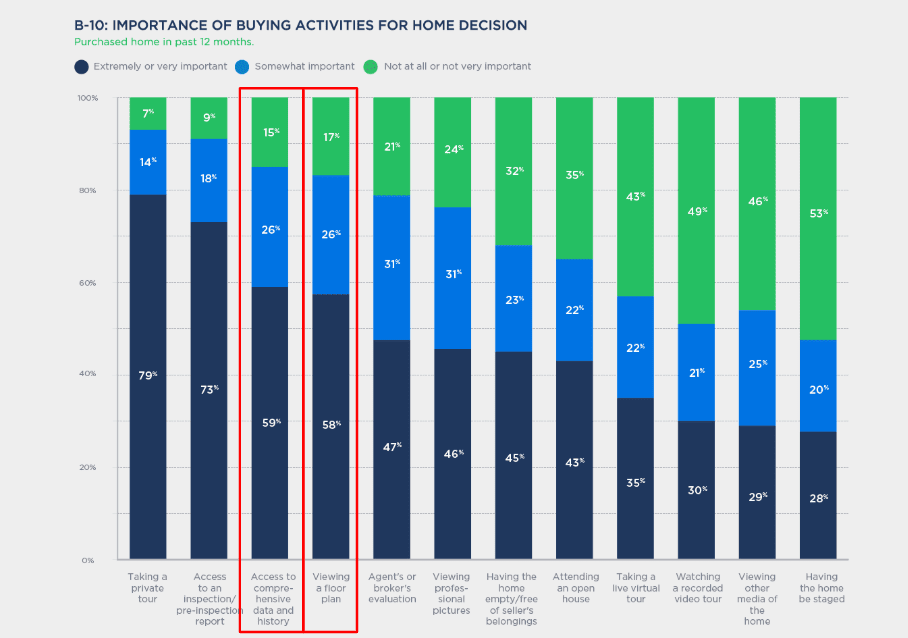
“According to independent research, buyers want to see photos first, with floor plans a close second, in terms of essential information for real estate listings. Yet, most listings today have few floor plans (not to mention interactive ones) and often, the photos have a ways to go in terms of meeting the online buyers’ needs. Floor plans are hard to get, so they get ignored, and things like online videos get more hype,” said Cone. “Yet, we make it pretty easy to get a high tech solution from a low tech process. We can do floor plan clean-up of existing architectural drawings, marketing brochures, or hand drawn sketches; or we can use one of our authorized service providers to visit the property to create a floor plan from scratch. With service in 49 states, we’ve got most of the metro areas covered with floor plan services. We can also do a self service tour anywhere in the world.”

Room Planner by FloorPlanner and FloorPlanOnline

“We are excited about our new relationship with FloorPlanOnline,” said Jeroen Bekkers, CEO of FloorPlanner.com. “This technology agreement is part of our licensing plan to work with key website properties around the world and enable them with the FloorPlanner tools. FloorPlanOnline obviously has a great customer base that values the services they provide to make getting a floor plan easy, and we are excited to help enhance their product offering with the RoomPlanner tool.

Their strategy is right on – one of our integrated partners in the Netherlands, Funda.nl, just had interactive floorplans overtake videos as the most popular premium feature on Funda.nl. Buyers want to see floor plans and plan their new potential home…and why not, it is the most expensive purchase decision most people make in their lives!”

About FloorPlanOnline.com

FloorPlanOnline was co-founded by Kris Cone on 2004, and it started commercial service in 2005. It has created thousands of Interactive FloorPlan Tours over the last 5 years on a self and full service basis. It serves many of the top real estate brands and has thousands of registered users. FloorPlanOnline has maintained over a 95% customer satisfaction rating and continues to get high marks for its tours and its customer service. FloorPlanOnline has country specific service offerings in the Unites States, Canada, the United Kingdom, and South Africa. Learn more at www.floorplanonline.com.

About FloorPlanner.com

FloorPlanner.com started business in 2006. Jeroen Bekkers, a trained architect, heads up a small interactive design shop in Rotterdam called Suite 75. He created Floorplanner to get, much more simply, the same results that professionals gin up with sophisticated computer-aided design software. FloorPlanner.com has partnered with many real estate oriented properties around the world to bring their drawing tools to their users and customers. Learn more at www.floorplanner.com.

# # #


FloorplanOnline® version 2.0 provides Buyer, Seller and Agent valuable resources

ISSAQUAH, WA –FloorPlanOnline® (FPO), an interactive floorplan website that offers buyers and real estate agents the ability to virtually tour properties online announces the launch of FPO 2.0, a redesigned and upgraded version of its interactive online floorplan tour.

The new version includes a more user-friendly integrated website that consists of upgraded navigation with different property content and multiple tour customization options. The advanced site presents the consumer with a myriad of Media options; including a Floor Plan Viewer with zoom-ability and full screen, Photo Viewer with large, high quality photos, WalkThruTM Video, and the new RoomPlanner that allows the user to drag and drop furniture onto the floorplan to experiment with furniture placement and design. The site also allows the listing agent to perform search engine optimization (SEO) on individual properties and do their own tracking via Google Analytics (or other tracking programs).

“FPO 2.0 brings a new, high level of information to the home buyer about a listing. Our goal is to provide the most robust content platform for properties online,” said Kris Cone, CEO of FloorPlanOnline®. “To be able to see the floorplan of a home, click on a room and see the photo of that room – it’s a powerful tool. To then further make it your own with the RoomPlanner gets the buyer interested and engaged. We are taking great care to offer this premium service affordably and efficiently through full or self service options.”

FloorPlanOnline® launched in 2005 to provide home buyers with an accurate depiction of property online including big crisp photos, video, disclosures and floorplans. The new and upgraded version of the original floorplan website builds upon the success that FPO has already established, including being mentioned by real estate guru, Barbara Corcoran on the Today Show in 2009.

Research completed in 2009 by the California Association of Realtors showed that 20 or more photos online reduced the time a home is on the market up to 50 percent. Other independent research has shown that floorplans were second to photos when buyers were asked what they wanted to see when looking for a home online. FPO provides both.

Top agents and companies like Shea Homes know how important statistics like these are and have called upon FloorPlanOnline to help them market their homes. Recently, universities like UCLA have also asked FloorPlanOnline to build interactive campus and building maps for new and prospective students.

About FloorplanOnline
FloorPlanOnline created the Interactive FloorPlan Tour to fill the gap in the market created by traditional virtual tour services – namely, the inability to see the property layout before an actual site visit. FPOs products can save the Buyer, Seller and the Real Estate Agent valuable time while providing them key information that has been requested for years. FPO can be used for residential or commercial real estate listings, leases, retail centers and land development.

###
FPO 2.0 Virtual Tour Website for Realtors and REal Estate

Hi FloorPlanOnline Customers!

Well, the dust has settled from our weekend release of the new tour.  The release went surprisingly well….probably one of the best releases we have ever done in terms of few issues and the issues getting fixed quickly.   I did want to point out a few things that have come up today regarding the new tour and tour conversion.

1. Portrait vs Wide-screen View. Depending on your screen resolution, you may see a little different content view for photos, video and the floor plan.  If you have a screen resolution of 1024 pixels wide or less, you should see the “Portrait” version of the tour, which has photos in a 4:3 aspect ratio (similar to the old TV size before we had wide-screen TVs) and the Floor Plan View is the embedded floor plan vs the side by side floor plan view.  We have set it up this way because the content would have to be very small or it will run off the page to the right.  So to provide users with these screen resolutions the best view, we alter what they see to the Portrait view.  Users with screen resolutions larger than 1024 will see the Wide-screen view which has photos in a 3:2 aspect ratio (what most digital SLRs shoot today) and 16:9 photos will be supported with an ability to mouse around the photo.  In addition, the Floor Plan View will have the photos (here they are in a 4:3 aspect ratio) side by side with the floor plan, similar to the old tour view.  You can always change a Portrait version to a wide-screen by adding &ws=1 to the end of the tour lnk, such as www.seetheproperty.com/presentation_v2/presentation.php?order_id=61383&mode=branded&ws=1 ….so if you do see the portrait version, you can see how the Wide-screen will look.

We have noticed that on some computers, the widescreen version is not showing up as the default view when it should be…the Portrait version is, so that is something we are working to fix.

2. FloorPlan/Photo Icon issue for tours created between April 15th and April 30th. For tours produced between April 15th and April 30th, we have done some work to ready the floor plan for the new tour by making a version of it in Flash, so it can be zoomed in if it is used in the new tour.  Right now, if you convert a tour produced during this time frame to the new FPO 2.0 format, the floorplan on the tour is automatically changing to this flash version.  This causes all of the photo icons on the floor plan to be mis-placed because it is a different size and file type.   Therefore, be aware that if we convert the tour, the photos may need to be repositioned.  You can do this for free or we can do this for the $20 conversion fee – if this issue was brought up to you before the conversion.   We are working on a fix here.

3. Content Area View-ability. On some computers you may not be able to see the complete content area without scrolling.  We are aware of this issue and are working on a fix to adjust the size of the content window if your vertical screen resolution is 900 pixels or less.  We will make the content area  a little smaller so it fits on the screen without scrolling.

4. Some Internet Explorer Issues. On some computers, the Photos and Video may not load…you may get a blank area.  It appears to be an issue with Adobe Flash.  The simple fix is go to www.adobe.com and download the most recent version of Flash.  Install the update, close out your browser window, and then open it up again and try the tour.  This seems to fix the problem.   We are investigating what changed, as it was fine last week….this could have been caused by a recent Windows Update.   The tour works in Firefox, Chrome and Safari.  Go figure…another issue with Microsoft software???

We have had some great comments so far.  Please send us comments, testimonials, complaints and more!

Cheers

-Kris Cone

FloorPlanOnline launched the new FPO 2.0 Format on May 1, 2010.  Your orders will now automatically receive the new enhanced premium virtual tour.  
Enhancements are everywhere – Video, Photos, FloorPlan and Room Planner all with new crisp wide format, new easy to use navigation and built in local link tool, Google maps and Street View,  Social Media and  SEO.

New To FloorPlanOnline? Registration is FREE HERE.
For More info on FPO 2.0 check out this post.

FPO 2.0 will bring a high level of information to the home buyer about a listing.  Our goal is to provide the most robust content platform for property online. We are taking great care to offer this premium service affordably and efficiently.

FPO 2.o by FloorPlanOnline Real Estate Marketing

Simple – We can Photograph, Measure and Produce
Effective – Buyers want to see Floor Plans with Photos
Affordable – Feature Rich without a Long Term Contract
Premium Virtual Tours for Top Agents

Categories Technology, Tour Updates, What's New
Comments (0)

Google launched a new add-on feature to its popular gmail service today to allow users to share updates and information, similar to what you can do on Facebook and Twitter.  Gmail is #3 in popularity behind Yahoo and Hotmail.   Good strategy?  I guess if each”buzz” can generate new ad space for Google…probably.

Click here to read the full article.

Categories Technology
Comments (0)

For those of you that use Google Apps (like gmail for business, Google Docs, etc), please read the below. We highly encourage you to upgrade from Internet Explorer 6 if you are still using it. Microsoft is no longer support it, which means there are inherent issues, including security holes. Plus, it does cause a few issues with the edit process of the FloorPlanOnline tours. If you are afraid to upgrade to IE 8.0 (the latest), there is a way to upgrade to IE 7.0. Just go to Microsoft and the Internet Explorer download page and look for the IE 7 download. Or, use Firefox – I highly recommend it as a browser as it is faster and easier to customize. You will need to install the plugins for flash and adobe reader.  I understand some MLS systems may only work on Internet Explorer…but you can always use multiple browsers on your computer.

From Google

____________________________________

In order to continue to improve our products and deliver more sophisticated features and performance, we are harnessing some of the latest improvements in web browser technology. This includes faster JavaScript processing and new standards like HTML5. As a result, over the course of 2010, we will be phasing out support for Microsoft Internet Explorer 6.0 as well as other older browsers that are not supported by their own manufacturers.

We plan to begin phasing out support of these older browsers on the Google Docs suite and the Google Sites editor on March 1, 2010. After that point, certain functionality within these applications may have higher latency and may not work correctly in these older browsers. Later in 2010, we will start to phase out support for these browsers for Google Mail and Google Calendar.

Google Apps will continue to support Internet Explorer 7.0 and above, Firefox 3.0 and above, Google Chrome 4.0 and above, and Safari 3.0 and above.

Starting this week, users on these older browsers will see a message in Google Docs and the Google Sites editor explaining this change and asking them to upgrade their browser. We will also alert you again closer to March 1 to remind you of this change.

In 2009, the Google Apps team delivered more than 100 improvements to enhance your product experience. We are aiming to beat that in 2010 and continue to deliver the best and most innovative collaboration products for businesses.

Categories Technology
Comments (0)