The innovative Premium Virtual Tour company FloorPlanOnline has done it again.
FloorPlanOnline continues to offer additional features and functions to its tours and single property websites…without charge. Real Estate Agents may now check a simple box and an automated process creates and posts a YouTube video of the listing online into the FloorPlanOnline YouTube Channel or….your own (or company’s) channel! It’s very simple to use – just use our normal video editing tools and save your changes. Best of all, this enhanced tour distribution service is FREE. The video will be available for download under Marketing Materials generally within 1-2 hours after saving your changes (time varies based on the number of videos in the processing queue). In addition, we also create a video file that can be used to upload into your Realtor.com Showcase listing. For now, this is something you must do as Realtor.com has no automated process for tour companies to handle this job for you.
More adventurous Realtors may opt to select different music, type in captions for each photo and edit photos to create a more personalized YouTube video. In order to take advantage of the new YouTube & Realtor.com tool – FPO customers should log in and edit their linking profile by checking the box to include the linking to the FloorPlanOnline YouTube channel. Then just make sure it is selected on the order as you place create a new tour.
This new tool works on all new tours created as of Monday, Aug 30th 2010. Click here to view an example video on YouTube or just play the sample below:
As with most enhancements and improvements to FPO tours, there is no additional fee for this feature. Other companies charge up to $20 or more, just to put a video on YouTube. On top of that, they charge up to $49 or more for the same virtual tour we price at $29. As long as your tour is active, including tours that have been renewed, you can create a video file and have the video uploaded to YouTube. Please read our FAQ below for more details on how to create a video file. Additionally, word from the FloorPlanOnline development department is that further options and YouTube related tools are being tested and tweaked for launch before the end of the year.
Why should you link the tour to YouTube, or Realtor.com? More online exposure. Most people are not going to YouTube to search for properties. In fact, according to the most recent NAR statistics, less than 1% of buyers in the survey sited YouTube as a source for online content. Realtor.com was one of the highest websites, however. However, putting the video on YouTube can help with search engine optimization…so your tour gets found, and you get it sold!
To learn more, just click on one of the FAQs below to read more details (click again to hide the detail).
[imasters-wp-faq cat=”13″]
That’s FloorPlanOnline – Simple, Effective and Affordable.
I would like to take a few moments to get your thoughts on the new and old tour formats to help guide our summer development efforts. Please click here to open up the short survey.
You will also get an email on this topic and there will also be an online message once you are logged in, so please only complete the survey one time.
Thank you in advance for your help in making FloorPlanOnline the most robust tour in the marketplace!
We are pleased to announce the addition of two great listing tools for you to use under the Tools menu option from our main website. We have added 14 different company branded Listing Presentation Templates as well as a generic presentation you can use to customize for your own brand if we do not have it listed. Just make the applicable edits to the different pages and save. We provide both a PowerPoint and Google Docs version. You can either print the materials out, or save to your computer and take your laptop with your and use as a tool to showcase how you will use FloorPlanOnline to market the seller’s home! you can also embed the Google doc version right into your website, just like below…so you can provide some key information to users browsing your site.
In addition, we added two printable one-page handouts on FloorPlanOnline under Tools>Marketing Downloads. One is for the Seller that you can leave as a handout and the other is something you can print out and hang up at your office.
Agents that have incorporated the FloorPlanOnline Marketing System into their listing presentations often get the listing – EVERY TIME! It can help demonstrate to the Seller that you know how to market a home, and in the most important place – ONLINE. After all, 96% of buyers in the key buying group use the Internet to search for homes. Don’t let your seller’s home be left out!
If you do not see a version for you company, just let us know and we can try to customize something for you. Just use the form below or on the Listing Presentation Template page.
We are excited to highlight new FPO tools and one Beta Tool on the FloorPlanOnline “Tour of the Week” Today.
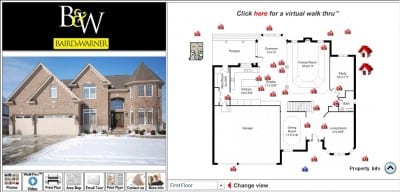
The FPO Custom Hotspot tool launched this month and allows agents to link youtube video, neighborhood websites or other FPO tours directly on the interactive floorplan. On this tour the hotspot tool is used three times to link various other content. Two “house” type hotspot icons on the right side of the floorplan take you to a tour of the area Clubhouse and amenity’s. The second “house” hotspot links to the Naperville Park district website. Imagine how buyers will appreciate the custom information and ease of use.
Live the Naperville luxury Lifestyle in this Brick Home - The FloorPlanOnline Tour of the Week.
Statistically Neighborhood Quality is the number one factor in deciding on a property (according this years NAR data). Thus – the more you can highlight about the quality of the neighborhood the better.
Secondly, the longer a visitor stays looking at a listing online, the more emotionally attached they become to the property. With the Beta FloorPlaner tool (gray icon to the left of the floorplan) buyers may select furnishings and move them into the home digitally. Select a couch, chair or lamp, and drag, rotate and click it into place. Its still in Beta testing, so not bug free – but a cool look at the possibility’s. Test the new tool here or on the tour above and give us your feedback!
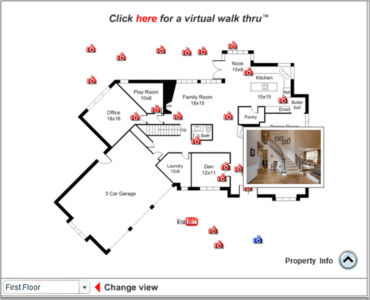
Finally, we introduced the mouse over feature on all listings as well. Simply mouse over the camera icon on the floorplan to view a thumb nail or click it to view the large photo.
Hi FloorPlanOnline users.
I wanted to give you a sneak preview of a floorplanner tool we are working on and get your thoughts. Can you review the tool below and then complete the poll on what you think. We are working to bring this, and some other exciting enhancements, to our tours soon. The embedded version is below, or Click Here to see the full screen version (so the icon library is not over the plan as in this embedded version).
Mouse Over with Photo Thumbnails. Today, we released a small but useful feature – Photo Mouse Over. Now, when you are viewing an Interactive FloorPlan Tour, you can mouse over a camera icon and a small thumbnail image of the photo will pop-up next to the camera icon. Click, and the photo will change on the left. This new feature will allow users to quickly preview photos of interest, and then click to get a larger view. It is available and live today on all tours – you do not need to do anything!
Embedded Object Enhancement. We have also enhanced the embeddable object for the Interactive FloorPlan to include the mouse over feature, although a larger size photo does show. In addition, we have included navigation buttons on the photos to allow for easier navigation between photos – just click the arrow buttons to go forward or back. The old way required you to click a camera icon, then close it, and then click another camera to navigate between photos. This new feature should make it much faster to view photos on the embeddable FloorPlan Tours.
You can easily add an Embeddable FloorPlan Tour to your blog sites or on many company sites (like Windermere, John L Scott, Coldwell Banker Bain, and others). Just think of the SEO benefits of creating a blog post for each of your listings – name the Post the address of your listing, add your marketing text, and then include the embeddable FloorPlan Tour. You can also add the video if you want as well! It adds more content to your website, keeps browsers there longer and turns them into buyers!
To configure your tour’s embeddable objects, just go to Manage Orders, then click the View link under Marketing Materials, then click the Embeddable Object button to get to the set-up page. You can change the colors of the buttons and the text on the buttons, and you can elect to show a “Full Tour” button (or change it to other text), which when clicked, will open a new window with the complete branded tour. All you need to do when you have completed your customization is hit the Apply button, then click the link above the code and right click your mouse to copy the embeddable object code. Then, go to your blog or listing detail page for your listing and right click your mouse to paste the code in the desired location. Add additional explanatory text on top or below the code, and save. That is it! It is cool, effective, and keeps the buyer on your website longer to become a buyer!