by Kris Cone | Jun 18, 2013 | Listing Tools, What's New
Now you can defer your FloorPlanOnline tour cost and pay it off AFTER you close that sale! Just pay with PayPal and select the Bill Me Later option (subject to your credit approval with their terms) and you can now defer payment for months. It is a cool, new free option offered by PayPal, the leader of ecommerce payments on the web.
by Kris Cone | May 21, 2013 | Listing Tools, Technology
We have made some updates to some of the tools you might use – the photo uploader and the WordPress plugin. Details are below.
1. Uploader. The photo uploader was updated with the most up to date functionality, powered by Aurigma, the company behind the upload functionality. There has been a lot of updates to Java recently which has caused some upload issues. So, because of the  update, you will likely need to install the small program that the uploader users. Just give it a few seconds to install. Depending on your browser, the experience will be a little bit different.
Note, the Select all button is a little different. Now, just check the box next to the folder name to select all images in the folder. Then select the upload button.
2. WordPress Plugin. We made some updates to the WordPress plugin that allows you to embed the tour or a pop-over version of the tour on your website. The update was needed due to some code conflicts with some themes. For now, the way to update the plugin is download it from the Embeddable Content page, or just click this button.
Download WordPress Plugin
by Kris Cone | May 17, 2013 | Listing Tools, Real Estate Info
 We just updated our support page on how to create floor plans yourself. We have some great options, and subscribers can upload plan images and use them for FREE, or use the drawing tool for just $10 a listing.
Click here to learn more.
by Kris Cone | May 9, 2013 | Help & FAQ, Listing Tools, Technology
Add all of your videos to your YouTube Channel…quickly & easily
Due to some changes made by Google, who owns YouTube, you now have to authenticate your YouTube account with FloorPlanOnline in order for us to automatically upload your Tour video files into your own YouTube channel. If you are just uploading to our YouTube channel, you can ignore the rest of this news post.
Why the Change? Originally, you logged into YouTube with a user name and password you created when you signed up for YouTube. Google has now completely integrated YouTube with the rest of the Google services, and they have eliminated the separate YouTube user name. It is now your Google login. Because the Google login also provides access to your email and other Google services, Google has implemented a “Facebook-like” authentication process for 3rd party websites, like FloorPlanOnline. All you need to do is allow access, which is the virtual handshake between our two sites, and the account is authenticated.
A few steps to do this.
1. You need to be logged into Google – either YouTube, your Google+ or your Gmail account. Do this in the same browser you are using to access FloorPlanOnline.
2. In your FloorPlanOnline account, go to Edit Profile and then click the Edit Tour Linking & Distribution button.
3. Under the Automated Website Distribution Service section, check the box to link toMy YouTube Channel. Once you check the box, a new window will pop from Google asking you to allow access. Click the blue button.
4. If you want the change to apply to all of your videos, just select the Yes option.
5. Go to the bottom and save.
That is it. Each time you create a video and Approve/Publish it, we will upload the video to your YouTube channel. Note, videos do get queued up in our video server, so there can be a delay of up to several hours depending on the time of day. If you mark the status of the listing as sold or off market, the video is automatically removed from YouTube. If you want to manually manage this, then just download the video under the Marketing Center (the Photos & Marketing Tools link under Manage Tours), and you can upload to YouTube manually.
Note either way, you can do some edits of the video, like add call outs, once it is on YouTube. If you want to show this YouTube video back on your tour, you can do that too….just use the YouTube embed code and paste it into the custom video section on your tour (not applicable to the 1.0 tour).
Enjoy!

by Kris Cone | Mar 6, 2013 | Listing Tools, Tour Updates
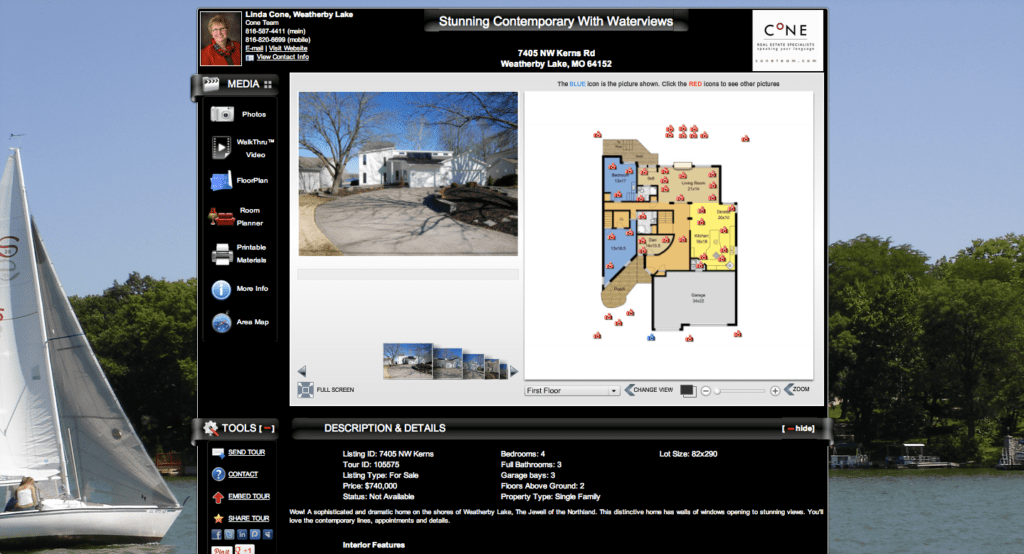
I am really excited to announce some cool updates to the Single Property Website Tour. Click here to see a sample tour.
Updates include:
- Centering of the tour on any web page (it used to be left justified)
- Better fitting of the content to eliminate scrolling of the main content area
- Cool wrap around styling of the content section headers
- Ability to change the overall background color…so now you have two colors to showcase your brand and enhance the look of the tour. It makes the content really pop!
- Ability to upload a background image – this could be the image of the property, a view of the area, or a custom branding image featuring your logo. For now, the custom background image only shows on the branded tour.
You can make these changes on a tour by tour basis, or in your profile to have them apply to all future tours.
A little tip. If you use Google’s Chrome browser, you can install a free “color picker” tool that allows you to get the color code for any color on any web page. Click here for a list of programs you can install for free to get the color code. Once you have the code, go to Edit Details on the Manage Tours page for a tour, or Edit Profile, and put the color either in the background 1 or background 2 spot. You can also do this for text. For example, this green is the color code #878f55
It is really simple to do and is another way you can really showcase your brand. The next training session will go over some advanced tour customization tricks. Click here to register…it is FREE!
 We would love to hear feedback….please comment or post something in our support forum.
by Kris Cone | Feb 18, 2013 | Listing Tools, Tour Updates, What's New

Thanks to one of our providers in the LA area, you can see a great example of the Video Clips & Voic eover capability. Just click here to view the tour video and see how well an intro & exit video, video clips and a voice over works to really help sell this property.